Save your project file. To save project just click "Save" button on the Toolbar or select "Save" or "Save As�" in the Main menu.
Save your menu in the HTML format. To do it click "Save HTML" button on the Toolbar or select "File/Save as HTML..." in the Main menu.
Insert your menu into the existing HTML page. To do so, click "Page insert" button on the website buttons Toolbar.
EASY DROP UP MENU
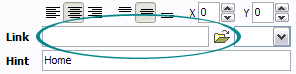
Now let's set the html buttons web-behavior. That is, set their Link properties. To set the button link, select the button by clicking it and then enter the link address in the "Link" field on the Properties toolbox.
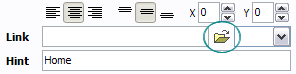
Another way to set the button link is to select it and then click the "Select page" button on the Properties toolbox. Open dialog will appear, in which you can select the page you would like to link to. This page's address will then appear in the "Link" field.
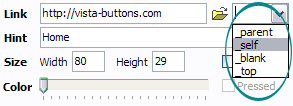
Also, you can assign link target attributes for each button. This will define where a linked page will be opened in your Web-browser. For example "_blank" attribute will open the linked page in new browser window. Note that link target attribute act exactly like the Target attribute of the <a> tag in HTML. To set button link target attribute, just select the button and then either choose one of the predefined values from the "Link target attributes" list on the Properties toolbox or enter your own value (window/frame name, where the linked page should be opened). Learn more about link target attributes from the user guide.
DESCRIPTION
Submenus drop down over all the objects of the page (select, flash, object, embed).
You don't have to know HTML, JavaScript, CSS or any other coding languages. Vista Web Buttons will generate all necessary images, html, javascripts, css styles automatically!
High Quality and Professional Results
You don�t have to know HTML, JavaScript, CSS or any other coding languages to make multi-state rollover web buttons, professional cross-browser, search engine friendly DHTML menus.
Vista Web Buttons will generate all necessary images, html, javascripts, css styles automatically!
Dynamic Webpage Dropdown
Vista-style menus
Web menus, which are created by Drop Down JavaScript Menu, exactly correspond with Windows Vista graphic interface components. That is why the visitors of your site will not have to spend their time in order to familiarize with the unusually-looking navigation. Nevertheless, you are not limited by the standard Windows themes, and you will be able to create your own original buttons.
EasyDrop Down Menu Link links of easydrop down menu in a new window. We just wnat to know if posible to do it. A: I think that it is not possible to create such menu using Pop upmenu.
Best free drop down menu generator Up to 4 levels. Easy configurable, ready to use menu. Make your site navigation in minutes. Easy-to-use drop-down menu to guide people through your pages. Designed
EasyDrop Down Menu Link links of easydrop down menu in a new window. We just wnat to know if posible to do it. A: I think that it is not possible to create such menu using Pop upmenu.
Drop Down Menu Html : Free Download Mac Software Flash Drop down menu. Up to 4 levels. Dreamweaver extension. Search engines friendly! Easy configurable flash menu. Make your site navigation in minutes with this menu.
Best free drop down menu generator Up to 4 levels. Easy configurable, ready to use menu. Make your site navigation in minutes. Easy-to-use drop-down menu to guide people through your pages. Designed
Drop Down Menu Html : Free Download Mac Software Flash Drop down menu. Up to 4 levels. Dreamweaver extension. Search engines friendly! Easy configurable flash menu. Make your site navigation in minutes with this menu.
HTML Drop Down Menu Generator | ricocheting.com When and how to change the page Page changes when menu changes Use default text button. Use image button: Menu Properties Menu Name: (change menu name if multiple menus on
EasyDrop Down Template I am setting up a simple javascript dropdown validation system. There is lol. html and css coding is so easy. your drop down menu should be labeled in your HTML page
How to Clean UpDrop Down Menus in Firefox | eHow.com Drop down menus in the Firefox browser can be extremely useful and save you time filling out forms. However, it can be frustrating to see outdated information or typos. If you
Adobe Style Drop Down Menu. Key features - unlimited color schemes and customizable transparency - drop down menu over Easy, effective, impressive result.
Vertical and Horizontal Drop Down Menus It is very easy to create drop down menus in Fireworks. Here are the steps you need click on the slice and click on Add Pop-UpMenu
HTML Drop Down Menu Generator | ricocheting.com When and how to change the page Page changes when menu changes Use default text button. Use image button: Menu Properties Menu Name: (change menu name if multiple menus on
HTML Drop Down Menu Creator Create a dropdown menu using this easy HTML generator. Open up a notepad document. Insert the called options menu and you will see your drop down menu box
Easy to Style jQuery Drop Down Menu Tutorial Easy to Style jQuery Drop Down Menu Tutorial. Drop down menu is always the most famous solution in is the art of taking close up pictures to
Drop Down Menu Free Download Drop Down Menu Description: Flash Drop down menu. Up to 4 levels. Dreamweaver extension. Search engines friendly! Easy configurable flash menu.